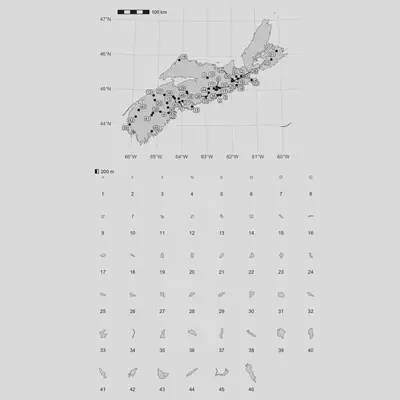
Day 24: The Mud Lakes of Nova Scotia

With apologies for skipping the last 18 days…it’s day 24 of the 30 day map challenege and I’m back!
In my first post about SedonaDB I did a brief investigation into the least creatively named waterbodies in Nova Scotia based on the water segments data in Nova Scotia. Anecdotally I’m also aware that there are many “Long Lake"s and “Little Rivers” out there that paddlers (and lake scientists) have to contend with. My favourite of these names is “Mud Lake”. Let’s make a map!
Today I’ll use SedonaDB for R, as installed from SedonaDB on R Universe, in addition to r-spatial favourites sf, wk, and geos. For visualization I’ll use ggplot2 and ggspatial with extras provided by ggrepel and patchwork. We’ll start with installing SedonaDB since that is a little non-standard at the moment:
install.packages('sedonadb', repos = c('https://apache.r-universe.dev', 'https://cloud.r-project.org'))
Next we’ll load the lakes data we’re working with. In some previous posts I’ve downloaded the data but I’ve subsequently realized that on my computer, iterating is just as fast leaving the data on the server (in this case, a GeoParquet file).
library(sedonadb)

url <- "https://github.com/geoarrow/geoarrow-data/releases/download/v0.2.0/ns-water_water-poly_geo.parquet"
sd_read_parquet(url) |> sd_to_view("water_poly")
We could use sd_view("water_poly") to get a preview, although I’ll first peek at the column names to see if we can’t a more useful view off the bat. Note that sd_read_parquet() is lazy and won’t read more than a few rows until we force execution (usually by collecting the result into some R object).
sd_view("water_poly") |> colnames()
##  [1] "OBJECTID"   "OBJECTID_1" "FEAT_CODE"  "ZVALUE"     "MINZ"
##  [6] "MAXZ"       "POLY_CLASS" "NAMEID_1"   "NAME_1"     "HID"
## [11] "SHAPE_LENG" "SHAPE_AREA" "SHAPE_LEN"  "geometry"
Ah! To find my Mud Lakes I’ll bet I need NAME_1. Let’s see what we’re up against.
sd_sql('SELECT "NAME_1", geometry FROM water_poly') |> head(5)
## ┌──────────────────┬───────────────────────────────────────────────────────────┐
## │      NAME_1      ┆                          geometry                         │
## │       utf8       ┆                          geometry                         │
## ╞══════════════════╪═══════════════════════════════════════════════════════════╡
## │                  ┆ POLYGON Z((255017.9274000004 4834135.7807 1.199999999997… │
## ├╌╌╌╌╌╌╌╌╌╌╌╌╌╌╌╌╌╌┼╌╌╌╌╌╌╌╌╌╌╌╌╌╌╌╌╌╌╌╌╌╌╌╌╌╌╌╌╌╌╌╌╌╌╌╌╌╌╌╌╌╌╌╌╌╌╌╌╌╌╌╌╌╌╌╌╌╌╌┤
## │                  ┆ POLYGON Z((256922.12829999998 4821474.2807 0.89999999999… │
## ├╌╌╌╌╌╌╌╌╌╌╌╌╌╌╌╌╌╌┼╌╌╌╌╌╌╌╌╌╌╌╌╌╌╌╌╌╌╌╌╌╌╌╌╌╌╌╌╌╌╌╌╌╌╌╌╌╌╌╌╌╌╌╌╌╌╌╌╌╌╌╌╌╌╌╌╌╌╌┤
## │                  ┆ POLYGON Z((257264.3273 4821808.1807 1.1999999999970896,2… │
## ├╌╌╌╌╌╌╌╌╌╌╌╌╌╌╌╌╌╌┼╌╌╌╌╌╌╌╌╌╌╌╌╌╌╌╌╌╌╌╌╌╌╌╌╌╌╌╌╌╌╌╌╌╌╌╌╌╌╌╌╌╌╌╌╌╌╌╌╌╌╌╌╌╌╌╌╌╌╌┤
## │ Flat Island Cove ┆ POLYGON Z((257456.37930000015 4821990.445699999 0.899999… │
## ├╌╌╌╌╌╌╌╌╌╌╌╌╌╌╌╌╌╌┼╌╌╌╌╌╌╌╌╌╌╌╌╌╌╌╌╌╌╌╌╌╌╌╌╌╌╌╌╌╌╌╌╌╌╌╌╌╌╌╌╌╌╌╌╌╌╌╌╌╌╌╌╌╌╌╌╌╌╌┤
## │                  ┆ POLYGON Z((257101.62729999982 4821664.080700001 0.899999… │
## └──────────────────┴───────────────────────────────────────────────────────────┘
## Preview of up to 6 row(s)
Perfect! I can set up a tiny bit of SQL to fetch the Mud Lakes in the data. I didn’t do it here because I do happen to know this bit of SQL, but in my previous posts I’ve had great luck getting an LLM to generate the SQL for me (a lovely dplyr interface would be great; however, we’re not there yet). We can use sf::st_as_sf() to collect the SedonaDB data frame into the sf object we’ll need to make the plot.
mud_lakes <- sd_sql('SELECT geometry FROM water_poly WHERE "NAME_1" = \'Mud Lake\'') |>
    sf::st_as_sf()

mud_lakes
## Simple feature collection with 46 features and 0 fields
## Geometry type: POLYGON
## Dimension:     XYZ
## Bounding box:  xmin: 252117.3 ymin: 4853986 xmax: 721879.5 ymax: 5110472
## z_range:       zmin: 7.5 zmax: 237.4
## Projected CRS: NAD_1983_CSRS_2010_UTM_20_Nova_Scotia + CGVD2013(CGG2013) height
## First 10 features:
##                          geometry
## 1  POLYGON Z ((252232.2 487601...
## 2  POLYGON Z ((272107 4901272 ...
## 3  POLYGON Z ((322568.3 490572...
## 4  POLYGON Z ((326730.5 491263...
## 5  POLYGON Z ((322850.6 485443...
## 6  POLYGON Z ((376394.6 491280...
## 7  POLYGON Z ((375149.9 493036...
## 8  POLYGON Z ((372093 4944259 ...
## 9  POLYGON Z ((391370.3 496535...
## 10 POLYGON Z ((395681.2 496018...
Alright! The next step is the plot. I’ll use ggplot2 and ggspatial for this because I have a bit of a plan in mind…I’d like to plot every single one of the mud lakes in a big grid. Let’s start with plotting just one of them.
library(ggplot2)
library(ggspatial)

ggplot() +
    layer_spatial(mud_lakes[1, , drop = FALSE]) +
    annotation_scale(location = "bl") +
    theme_minimal() +
    theme(axis.text = element_blank())

This plot has vaguely what I’m looking for: the lake, a minimal theme, and a scale bar. At first I tried to use fact_wrap() to plot all of the lakes; however, this doesn’t quite work because coord_sf() doesn’t work with scales = "free" (probably a good thing…as we’ll see, this is complicated!). Instead I’ll make a list of the plots and combine them using patchwork.
plots <- lapply(seq_len(nrow(mud_lakes)), function(i) {
    ggplot() +
    layer_spatial(mud_lakes[i, , drop = FALSE]) +
    annotation_scale(location = "bl", ) +
    theme_minimal() +
    theme(axis.text = element_blank(), panel.grid = element_blank())
})

patchwork::wrap_plots(plots, ncol = 6)
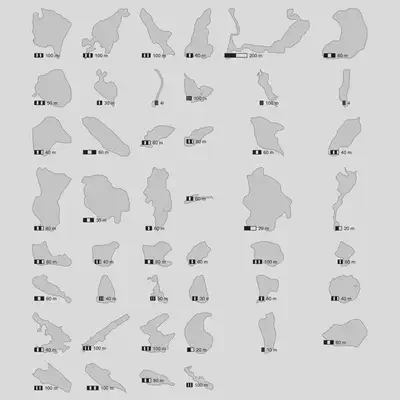
While this is vaguely what I had in mind, it’s still pretty ugly. I don’t like that the scale bars are of all different sizes and that the zoom for each of the plots is kind of arbitrary (big lakes and small lakes are mixed and it’s tricky to stay oriented).
To solve this problem, I’m going to create a tiny bit of fake data to plot on the map behind each lake. GEOS has the concept of a “minimum bounding circle” and it’s wired up in the geos R package in such a way that we can extract the radius relatively easily.
mud_lakes$bounding_circle <- geos::geos_minimum_bounding_crc(mud_lakes$geometry)
mud_lakes$bounding_circle_radius <- wk::crc_r(mud_lakes$bounding_circle)
Next I’m going to create a bounding circle of the maximum size (roughly a few hundred meters) for all the Mud Lakes, still centered for each. The effect of this is that each row of the data will have an identically sized circle so that when each row is plotted individually that the scale will be the same.
mud_lakes$crc_for_scale <- mud_lakes$bounding_circle |>
  wk::crc_center() |>
  geos::geos_buffer(max(mud_lakes$bounding_circle_radius)) |>
  sf::st_as_sfc()
Finally, I’ll sort them by size. Visually this is kind of nice even though it’s still a little arbitrary (another option would be to sort vaguely by location but that’s more complicated).
mud_lakes_sorted <- mud_lakes[order(mud_lakes$bounding_circle_radius), ]
mud_lakes_sorted$label <- as.character(seq_len(nrow(mud_lakes_sorted)))
I’ll make the plots again and see what we have. I tweaked this a bit iteratively with the rest of the post since these plot objects show up in the final result. The circles I just calculated I throw into shadow_spatial(), which was built exactly for this purpose! It ensures the map area contains the input data but doesn’t actually plot it. This is incredibly useful if you need to ensure a whack of maps plot identical extents.
plots <- lapply(seq_len(nrow(mud_lakes)), function(i) {
  ggplot() +
    shadow_spatial(mud_lakes_sorted[i, , drop = FALSE]$crc_for_scale) +
    layer_spatial(mud_lakes_sorted[i, , drop = FALSE]) +
    (if (i == 1) annotation_scale(location = "tl", width_hint = 0.2)) +
    facet_wrap(~forcats::as_factor(label), strip.position = "bottom") +
    theme_minimal() +
    theme(
        axis.text = element_blank(),
        panel.grid = element_blank(),
    )
})

patchwork::wrap_plots(plots, ncol = 6)
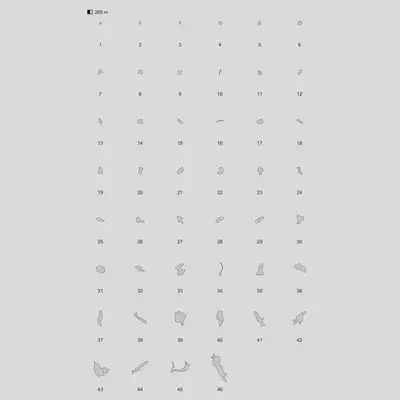
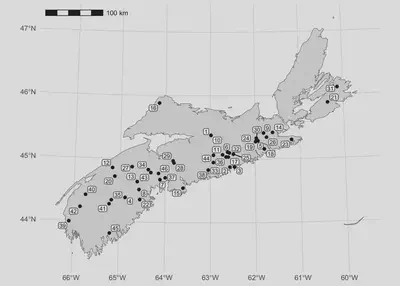
We’re cooking! The only thing missing is an overview to tell us where all of these things are. For this we’ll need some boundaries, and one of the most comprehensive (open) sources of boundaries is Overture Maps. These are organized as directories of GeoParquet files and SedonaDB is great at those! We do have to set some environment variables off the bat (unless you have AWS credentials configured on your machine in some standard way already).
Sys.setenv(
    AWS_SKIP_SIGNATURE = "true",
    AWS_DEFAULT_REGION = "us-west-2"
)

"s3://overturemaps-us-west-2/release/2025-11-19.0/theme=divisions/type=division_area/" |>
    sd_read_parquet() |>
    sd_to_view("divisions")
I’ll use the same pattern as above to get the column names and a bit of information to try to find the boundary I’m looking for.
sd_view("divisions") |> colnames()
##  [1] "id"             "geometry"       "bbox"           "country"
##  [5] "version"        "sources"        "subtype"        "class"
##  [9] "names"          "is_land"        "is_territorial" "region"
## [13] "division_id"
I ran SELECT DISTINCT on a few of the columns to see exactly what I needed to include in my filter…I landed on the subtype, country, and region being the important concepts.
sd_sql("SELECT DISTINCT subtype FROM divisions WHERE country = 'CA'") |>
    sd_preview(n = Inf)
## ┌──────────────┐
## │    subtype   │
## │     utf8     │
## ╞══════════════╡
## │ microhood    │
## ├╌╌╌╌╌╌╌╌╌╌╌╌╌╌┤
## │ country      │
## ├╌╌╌╌╌╌╌╌╌╌╌╌╌╌┤
## │ county       │
## ├╌╌╌╌╌╌╌╌╌╌╌╌╌╌┤
## │ macrohood    │
## ├╌╌╌╌╌╌╌╌╌╌╌╌╌╌┤
## │ locality     │
## ├╌╌╌╌╌╌╌╌╌╌╌╌╌╌┤
## │ neighborhood │
## ├╌╌╌╌╌╌╌╌╌╌╌╌╌╌┤
## │ region       │
## └──────────────┘
## Preview of up to Inf row(s)
This is the query I landed on with some iteration to load Nova Scotia. I include some simplifying here to speed up the plot. I could do this in sf too but I happen to know we added ST_Simplify recently so I decided to give it a go.
ns <- sd_sql(
    "SELECT ST_Simplify(geometry, 0.01) FROM divisions WHERE region = 'CA-NS' AND subtype = 'region' AND is_land"
) |>
    sf::st_as_sf()
Next I’m going to set up the overview plot. I did quite a bit of iteration on the labels using the fantastic ggrepel package to insert non-overlapping labels for each of the lakes.
mud_lakes_center <- sf::st_centroid(mud_lakes_sorted)
mud_lakes_center$xy <- mud_lakes_center$geometry |> wk::as_xy() |> as.data.frame()

overview <- ggplot() +
  shadow_spatial(mud_lakes_center) +
  layer_spatial(ns) +
  layer_spatial(mud_lakes_center) +
  annotation_scale(location = "tl") +
  ggrepel::geom_label_repel(
      aes(x = xy$x, y = xy$y, label = label),
      data = mud_lakes_center,
      force_pull = 0.1,
      size = 2.5,
      label.padding = 0.1,
      max.overlaps = 25,
      box.padding = 0.1
  ) +
  theme_minimal() +
  labs(x = NULL, y = NULL)

overview
Finally, we can stitch this together using patchwork:
(overview / patchwork::wrap_plots(plots, ncol = 8)) +
    patchwork::plot_layout(heights = c(1, 1.5))